AI marking and learner evidence for training providers
Mark against your rubrics and KSBs, keep assessors in control, and build the evidence trail Ofsted and your EPA gateway expect without the admin overhead.
- Batch marking at scale
- EPA / Ofsted-ready evidence
- Enterprise console and departments
- Governance and compliance
From marked work to gateway-ready packs
A typical provider workflow: assessors upload a cohort of assignment scripts against a shared rubric with KSB tags; AI drafts criterion comments and suggested bands; assessors review every draft (your organisation can require sign-off before release); learner packs pull marked evidence into an EPA-friendly structure; Reporting Hub and exports support IQA and gateway sampling.
What needs provider configuration: your rubric/KSB library, department seats, release rules, and which tools (similarity bank, ALS reporting, ULN) are switched on for your enterprise. Schools and MATs looking for classroom mocks should use AI marking for UK schools instead.
Pilot estimate from a live rollout
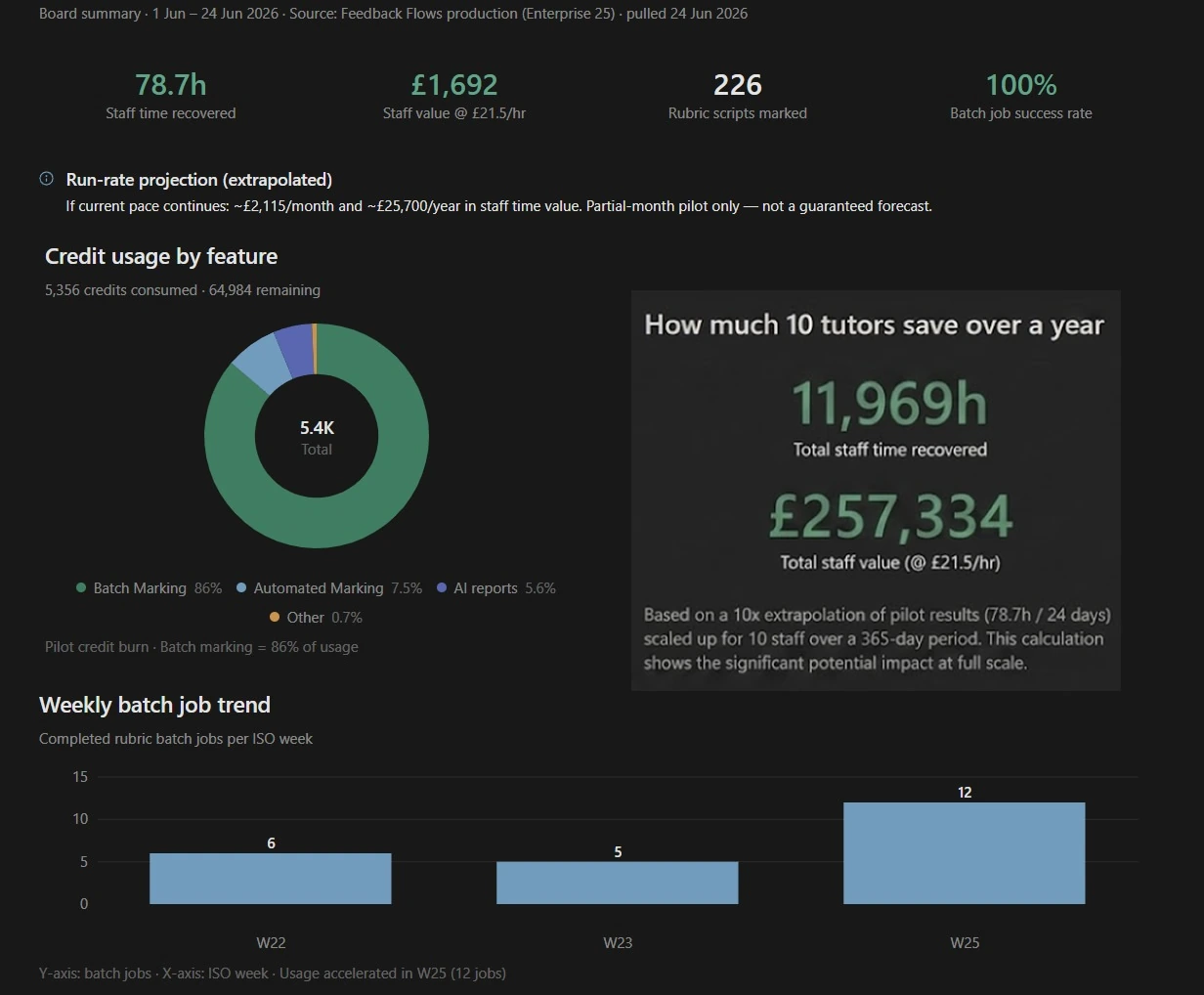
These figures are a platform estimate from an enterprise pilot in June 2026 (one assessor, batch rubric workflows): 21 minutes per script × 226 scripts, valued at £21.50/hr. They are not independently measured stopwatch times.
Assumption: ~21 minutes of assessor time per script at £21.50/hr. Your minutes-per-script setting in the enterprise console controls how time-saved estimates are calculated for your organisation.
More than a time estimate
Batch jobs run in the background while assessors coach learners, visit employers or handle IQA. Rubric-aligned comments, learner packs and integrity checks sit alongside the mark.
- Richer feedback: Rubric-aligned comments, targeted worksheets, and progress reports, not just a mark on a page.
- Tracking on top: Learner histories, cohort analytics, and audit-ready evidence for IQA, Ofsted, and EPA gateway.
- Integrity built in: Writing fingerprint, AI detection, and reference checking layered onto marked scripts where enabled.
Six steps from paper to signed-off feedback
Your paper, your scheme, human review at the end.
Upload the paper and mark scheme
Upload the blank question paper and mark scheme as they are (PDF or Word). Stored as a reusable question bank.
Upload the cohort ZIP
Zip the scripts together. Handwritten scans or typed work both work.
AI marks every script
Each learner gets scores and individual feedback against your scheme while assessors keep working.
See the cohort picture
Full breakdown: where the group struggled most, where they did best, and which teaching or delivery gaps need another look.
Get a worksheet per learner
Targeted practice from the topics each learner missed, shaped by your instructions.
Review, release, report
Edit borderline marks, release when ready, and use reporting for quality and leadership. The AI never publishes alone.
New team members can open the training suite for short walkthroughs of marking, feedback, and the rest of the toolkit.
Give your assessors their time back, without cutting corners on quality
Assessors at growing ITPs carry marking loads across employers, qualifications and cohort sizes. Feedback Flows automates grading and feedback so teams can focus on coaching, employer relationships and gateway support.
Batch marking at scale
Upload a full class set as a ZIP, apply your mark scheme, and return consistent rubric-aligned feedback in minutes.
Automated and exam paper marking
Upload the raw question paper and mark scheme (stored as a question bank), then a ZIP of handwritten or typed scripts. Feedback Flows marks each paper against your approved scheme.
Writing fingerprint and integrity
Build stylometric baselines, run batch style comparison, and screen submissions with the AI detector and reference checker.
Similarity bank
Compare marked work between learners in your organisation only. Similarity % on results, flagged at 50% or more, with a side-by-side compare.
Progress reports
Generate holistic learner progress reports from full marking histories to highlight gaps, strengths and improvement over time.
Targeted worksheets
When weaknesses appear, generate personalised worksheets and mark schemes focused on exact learner gaps.
Video and audio marking
Assess presentations and spoken tasks with AI-supported feedback for portfolio and practical evidence.
Interactive Feedback
Line-by-line annotated feedback with human-in-the-loop review. Edit every output before release.
Batch SPAG check & UK/US spelling
One-click spelling, punctuation and grammar checks on Rubric Batch Marking cohorts, with UK/US consistency, interactive highlights and per-student PDF or Word exports.
AI Tutor
Formative draft feedback that guides learners to improve without giving away final answers.
Learner Packs
Build branded assessment pack templates once; auto-fill personalised PDFs from marking history.
Syllabus and scheme of work
AI multi-week plans with differentiated lessons, homework and assessment packs from a source document.
Students, classes and upload links
Rosters, year groups, gradebooks and private student upload links. No learner accounts required. Learn more →
Human oversight built in
AI drafts grades and feedback; every assessor reviews and edits before publishing to learners.
The enterprise management console
Your quality team gets a single place to run operations: live assessment analytics, credit governance, shared marking resources and a searchable audit trail structured around how your provision actually works.
Analytics and insights
Filter by date range, rubric, subject and employer cohort.
- Organisation snapshot: active assessors, learners reached, average score, assessments completed.
- Pass and fail rates against your org pass mark, throughput and distinct learners touched.
- Outcomes by assessor and by class with low-sample warnings.
- Grade distribution, credit usage, stylometric risk charts and CSV exports.
User management
- Seat-based access with shared credit pool and monthly quota.
- Invite by email and bulk invite for full teams.
- Optional per-user monthly credit limits.
- Login visibility with last login and sign-in counts; export member roster to CSV.
Departments
- Organisation tree with department managers and bulk staff assignment.
- Setup wizard for subjects and structure; department comparison exports.
- Head-of-department oversight without changing frontline marking roles.
Policy Centre
- Automarking governance: org-wide policy controls and compliance views.
- Require human review before final completion, with configurable review modes.
- Per-assessor overrides; policy document upload with acknowledgement tracking.
Shared resource library
- Central rubric and question-template library aligned to your standards.
- Managers publish shared resources; members duplicate into working libraries.
- Subjects and departments mapped for cleaner analytics cuts.
Compliance exports
- Teacher and student compliance timelines for quality sampling.
- Exportable compliance packs for IQA and EPA gateway.
- Audit log with filters by member, action, resource type and date range.
Credit ledger and audit log
- Credit ledger with transactions, amounts, reasons and actor details; full CSV export.
- Usage and outcomes exports for SAR data, quality reports and MIS workflows.
Emailed reports
- Schedule automated digest emails to leadership, finance or governors.
- Configurable report sections, charts, time saved and cost savings.
- Multiple recipients and delivery history.
Settings, branding and ULN
- Organisation logo on the enterprise dashboard.
- Subjects, departments and pass mark configuration.
- Time-saved assumptions for ROI calculations.
- Configurable dashboard widgets and role-specific presets.
- Optional Unique Learner Number (ULN) fields for EPA-ready roster matching and evidence packs.
AI leadership tools
Enterprise AI Report
On-demand quality leadership synthesis from live marking data.
- Executive summary of org-wide performance and trends.
- CPD support signals and topic hotspots across cohorts.
- Scoped by assessor, subject and date; saved report library.
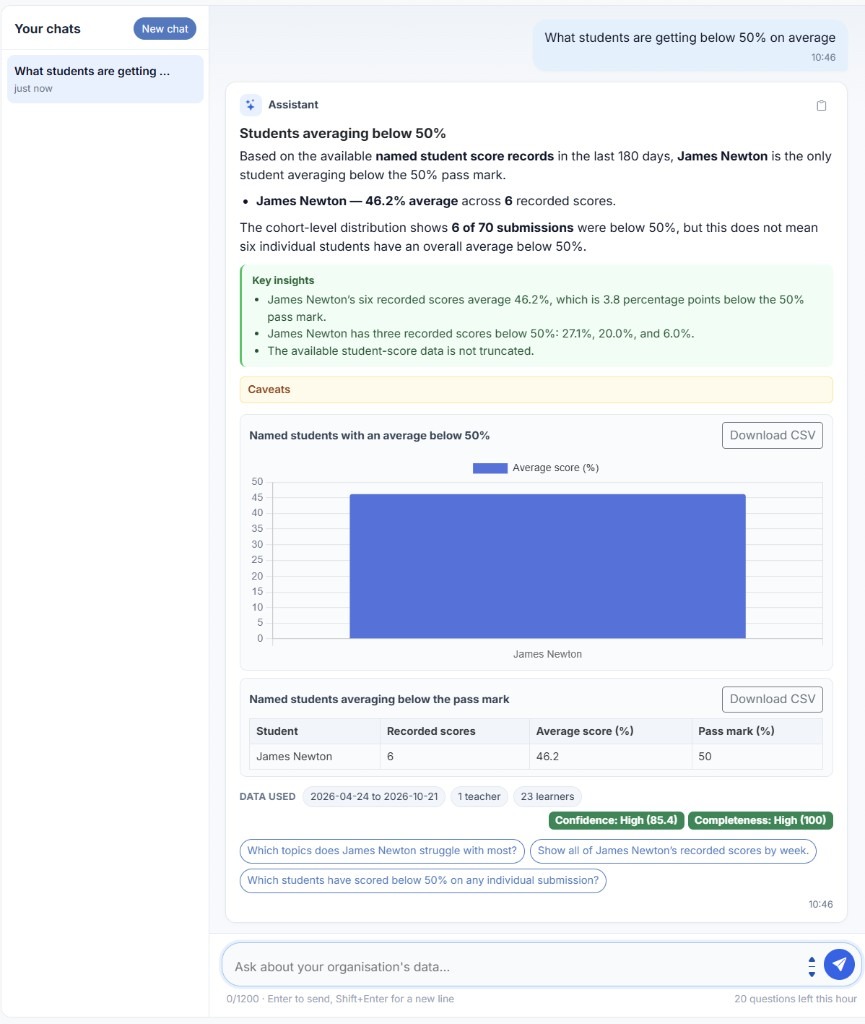
AI Chat analytics
Optional add-onSecure analytics Q&A for managers, separate from the in-app help chatbot. Available on request for enterprise customers.
- Ask follow-up questions in plain English about your own organisation's data.
- Answers and charts drawn only from your enterprise, scoped to the departments you manage.
- Private chats with tables, CSV export and suggested next questions.
Governance and compliance
Support IQA evidence trails, EPA gateway readiness and Ofsted-quality assurance with automarking governance, policy acknowledgements and a visible review backlog.
- Automarking governance with optional human review gates before final completion.
- Policy documents with staff acknowledgement tracking.
- Member review queue: outstanding scripts, review stats and items over 48 hours.
- Review backlog widget for managers; queue health monitoring.
- Stylometric risk analytics and integrity risk dashboards.
- Similarity bank: organisation-only copy checking with side-by-side compare.
- Full audit log and exportable ledger for compliance reporting.
Five role types built for your organisation
Capability-based access and tailored dashboard presets.
| Role | Who it's for | What they see |
|---|---|---|
| Owner | Accountable lead | Full enterprise console, including billing, roles and organisational settings. |
| Manager | Operations leads | Day-to-day console: members, policy, resources, analytics and settings. |
| Quality | IQA and quality coaches | Analytics, governance and reports (read-only oversight). |
| Commercial / Finance | CFO, business manager | Credits, ROI, seat forecast, time saved and reports (read-only). |
| Member | Frontline assessors | Member hub, shared library, personal throughput widgets and review queue. |
Outsourced mock exam marking: handwritten or digital
Offload large mock exam batches while keeping question-level breakdowns and cohort analytics for gateway preparation.
- Question-level mark breakdown.
- AI quality report on cohort-wide weaknesses.
- Leaderboard and CSV export for LMS or MIS.
Organisation pricing that fits your rollout
We quote from how many assessors need seats, how many learners you support, and how much work you expect to mark. Organisation plans are usually cheaper than stacking individual credit packs, with pooled credits, governance and rollout support.
Several organisations are already live on Feedback Flows. We are happy to set up a no-pressure trial so your team can try real work before you commit. See how quotes work on our pricing page.
Preparing for gateway? Read our guide on building EPA-ready learner evidence packs from marked work, IQA trails and template governance.